AI Mobile Coders
Design a Pagination Library: A Mobile System Design
In these interviews, the interviewer is usually not asking you to design an entire application. Instead, they want you to design a reusable piece of infrastructure that multiple teams, features, or applications can depend on.

In these interviews, the interviewer is usually not asking you to design an entire application. Instead, they want you to design a reusable piece of infrastructure that multiple teams, features, or applications can depend on.
Common library design prompts:
- “Design a pagination library.”
- “Design an image loading library.”
- “Design a logging library.”
- “Design an A/B testing framework.”
- “Design a feature-flag system.”
- “Design an analytics SDK.”
These problems are fundamentally different from traditional app design problems in several important ways.
In app design, the primary user is the end-user interacting with the UI.
In library design, the user is another developer consuming your API.
That changes the priorities significantly:
- API ergonomics become more important than UI polish
- One library is used by many features, so edge cases multiply quickly
- Backward compatibility becomes critical once version 1 is shipped
- Generics and type safety carry real architectural weight
- Threading behavior becomes part of the public contract
- Extensibility and maintainability matter as much as functionality itself
The expected interview output also changes.
Instead of pixel-perfect screens or feature flows, interviewers evaluate:
- API design
- interface contracts
- state management
- concurrency handling
- caching strategy
- failure recovery
- scalability of abstractions
Pagination is one of the best library design problems because almost every meaningful mobile application depends on it:
- news feeds
- social media timelines
- search results
- comments
- chat history
- transaction records
- notifications
- product catalogs
A pagination library touches multiple layers of the mobile stack simultaneously:
- networking
- persistence
- memory caching
- threading
- UI synchronization
- state management
It also exposes subtle edge cases that clearly differentiate junior and senior engineering thinking:
- duplicate detection
- scroll position consistency
- refresh invalidation
- retry handling
- stale data recovery
- prefetching strategy
- race conditions during concurrent loads
Another reason pagination is an excellent interview topic is that strong industry references already exist:
- Android Paging 3
- iOS AsyncStream-based pagination patterns
- React Query’s
useInfiniteQuery
This allows interviewers to probe deeper into tradeoffs and compare your design decisions against production-grade systems.
In this blog, we will design a pagination library end-to-end using a library-focused adaptation of CRDDS.
We will cover ten major design stages:
- Understanding the problem and defining scope
- Pagination strategies and protocol design
- Core abstractions and public APIs
- Designing the data source layer
- In-memory caching and page state management
- Loading states and error handling
- Refresh, retry, and invalidation flows
- UI binding and threading model
- Local persistence integration
- Tradeoffs, optimizations, and follow-up discussions
By the end of this article, you will not only understand how production-grade pagination systems work internally, but also how to confidently defend your design decisions in a real mobile system design interview.
Step 1: Understanding the Problem and Establishing Design Scope
The interviewer says “Design a pagination library.” with different clarifying questions because this is library design.
The Clarifying Conversation
You: “Big topic. Let me clarify. Is this a general-purpose library for any list, or specific to certain data sources?”
Interviewer: “General-purpose. It should work for any kind of paginated list — REST API, GraphQL, local database, in-memory.”
You: “What pagination strategies should it support? Offset-based, cursor-based, or both?”
Interviewer: “Both. Some teams use offset, some use cursor. The library shouldn’t force one choice.”
You: “Bidirectional pagination — scroll up to load earlier items, scroll down for later? Or just forward?”
Interviewer: “Forward-only for now. Bidirectional is a stretch — you can mention how the design would extend, but don’t implement it.”
You: “Platform — Android, iOS, both, or platform-agnostic Kotlin Multiplatform?”
Interviewer: “Focus on Android with Kotlin. Briefly mention how it would map to iOS Swift.”
You: “Should the library handle UI binding (RecyclerView adapter, LazyColumn), or just emit data?”
Interviewer: “Emit data via Flow. UI integration with RecyclerView and Compose LazyColumn is a thin layer on top — design both.”
You: “Local persistence — should we cache pages on disk, or just hold them in memory?”
Interviewer: “In-memory by default. The library should provide hooks for a Room-backed local store, but not require it.”
You: “Refresh semantics? Pull-to-refresh, invalidate-everything, or merge new data with existing?”
Interviewer: “Invalidate-and-refetch on user pull. Plus an invalidate API the app can call externally — for example, when a mutation changes the list.”
You: “Error handling? Retry strategies?”
Interviewer: “Network errors should be retryable from the UI. The library should support automatic retry with exponential backoff, but only for transient errors.”
You: “Concurrency — what if a user pulls to refresh while a ‘load more’ is in flight?”
Interviewer: “Sensible default: cancel the in-flight load when refresh fires. Make this configurable.”
You: “Item identity and deduplication? What if the API returns the same item across pages?”
Interviewer: “Library should expose a way to define item keys. Duplicates with the same key should appear only once. Items can update — same key, new content — and that should re-render.”
Summarize Back
“So we’re designing a Kotlin-first pagination library for Android. Strategy-agnostic — supports both offset and cursor-based pagination. Forward-only for v1, with extension paths for bidirectional. Emits data via Flow. Provides UI integration adapters for both RecyclerView and Compose LazyColumn. In-memory caching by default with optional Room-backed local store. Pull-to-refresh and external invalidation. Automatic retry with exponential backoff for transient errors. Cancels in-flight loads on refresh. Stable item keys for deduplication and updates. Sound right?"
The interviewer confirms.
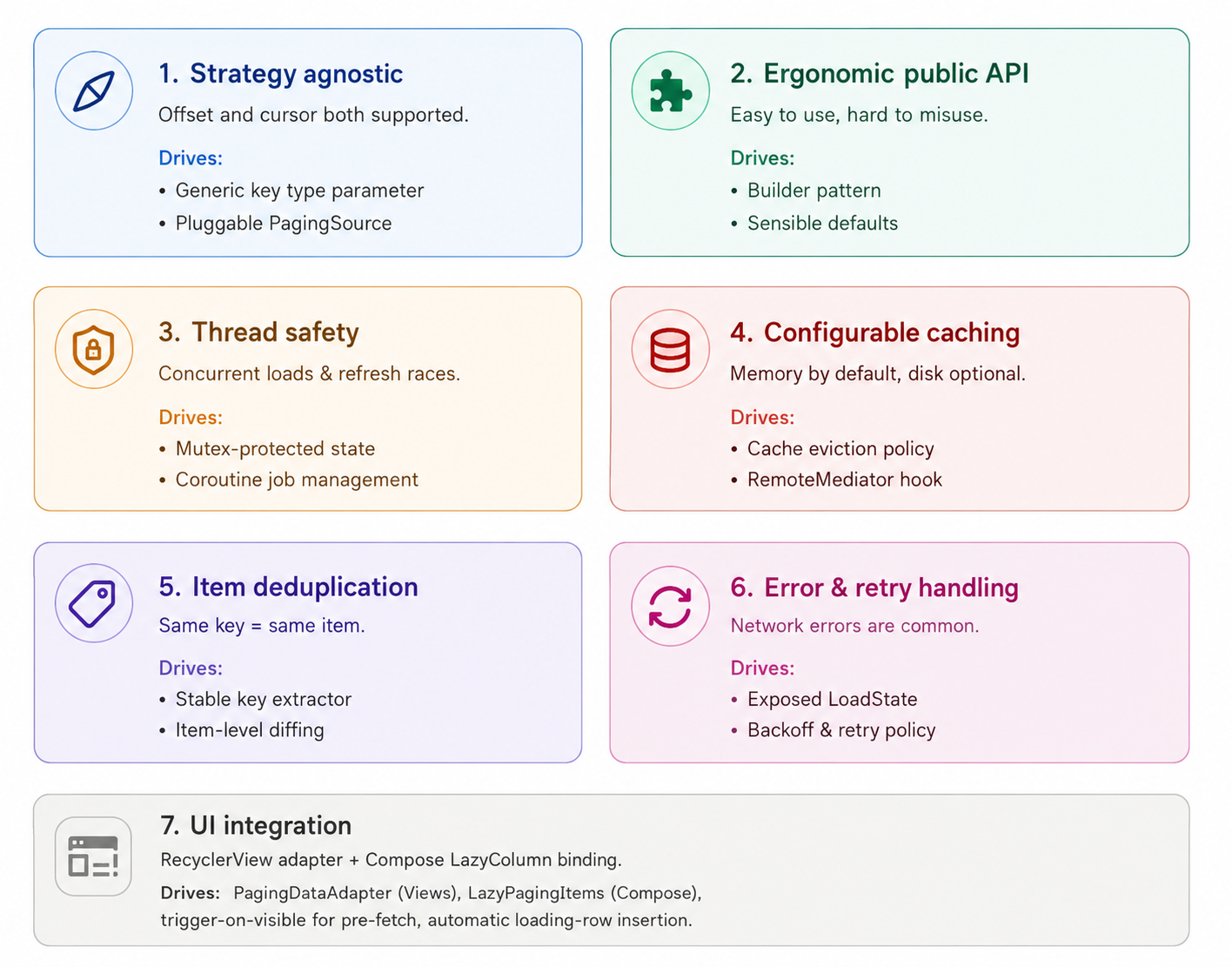
The Seven Pillars That Drive Every Decision
What “Good” Looks Like — A Sketch of Caller Code
Before we design internals, let’s sketch what the caller writes. A library’s primary product is the code its users write to consume it.
// 1. Caller defines a PagingSource
class PostsPagingSource(
    private val api: PostsApi
) : PagingSource<String, Post>() {

    override fun getKeyFromItem(item: Post): String = item.id

    override suspend fun load(params: LoadParams<String>): LoadResult<String, Post> {
        return try {
            val response = api.fetchPosts(cursor = params.key, limit = params.loadSize)
            LoadResult.Page(
                items = response.posts,
                prevKey = null,
                nextKey = response.nextCursor
            )
        } catch (e: IOException) {
            LoadResult.Error(e, isRetryable = true)
        }
    }
}

// 2. Caller creates a Pager via builder
val pager = Pager.builder<String, Post> {
    source { PostsPagingSource(api) }
    config {
        pageSize = 20
        prefetchDistance = 5
        enablePlaceholders = false
    }
}.build()

// 3. UI observes the Flow
@Composable
fun PostsScreen(pager: Pager<String, Post>) {
    val items = pager.flow.collectAsLazyPagingItems()
    LazyColumn {
        items(items.itemCount) { index ->
            val post = items[index]
            if (post != null) PostRow(post) else PlaceholderRow()
        }
    }
}
“Three things this caller code gets right:
- Type parameters make the source
<Key, Value>clear — keys are strings (cursors), values arePosts. - The
getKeyFromItemis how the library deduplicates and updates items by ID. - The builder pattern with named blocks makes configuration discoverable in IDE autocomplete.
Everything else — page caching, scroll-trigger prefetch, error recovery, loading states — happens inside the library. The caller focuses on the data source and the UI.”
This sketch is our north star. Every internal design decision must serve this caller experience.
Step 2: Pagination Strategies and the Protocol Layer
Different servers paginate differently. The library must support all of them without forcing the caller into one style.
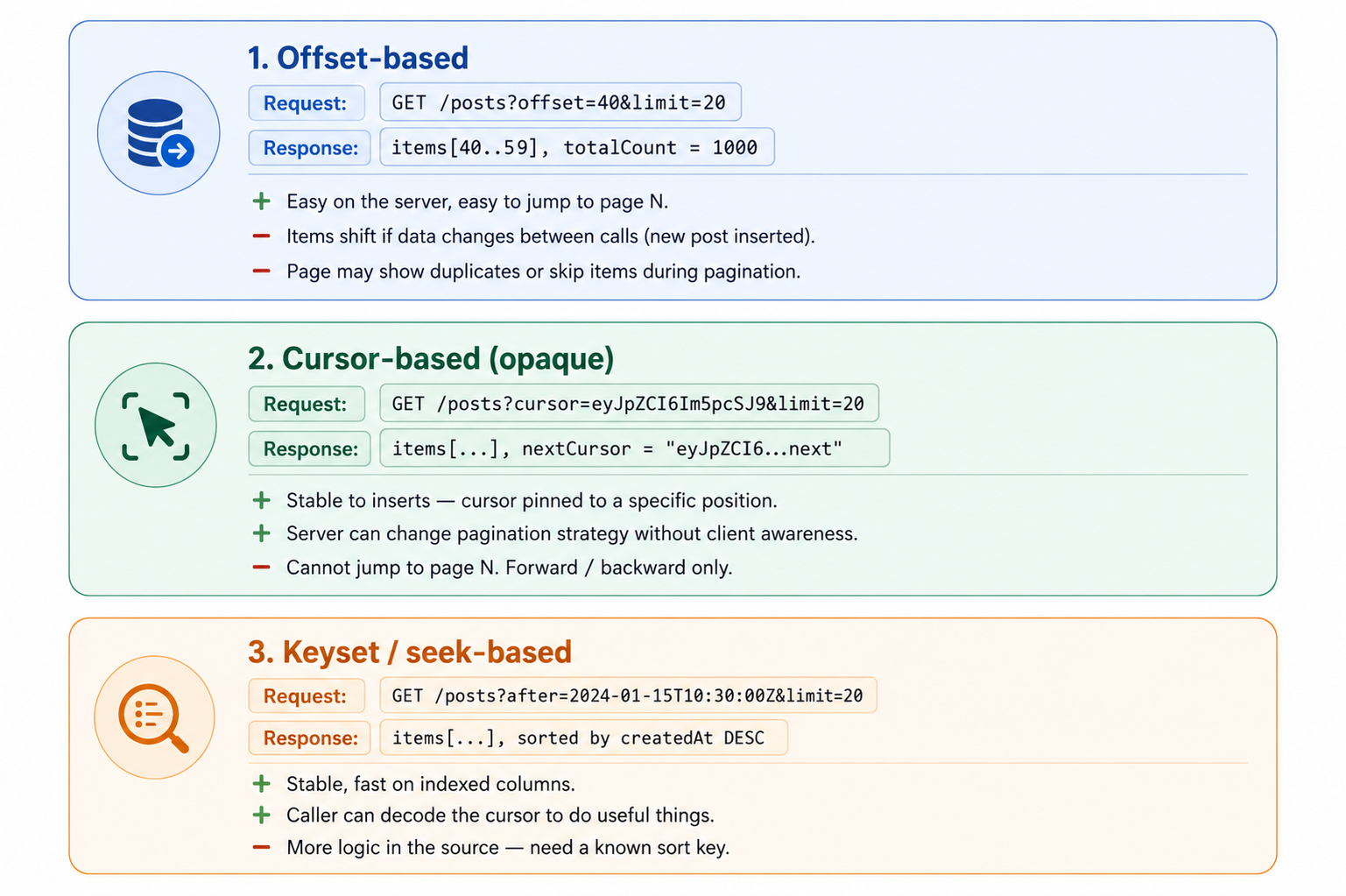
The Three Pagination Strategies
The Key Abstraction — A Generic Key Type
The library doesn’t pick a strategy. The caller picks by choosing the type parameter for Key.
“Three concrete examples:
- Offset:
PagingSource<Int, Post>— Key isInt, the next offset. - Opaque cursor:
PagingSource<String, Post>— Key isString, an opaque server token. - Keyset:
PagingSource<Instant, Post>— Key isInstant, the timestamp of the last item.
The library only cares that Key is a unique identifier for 'where to start the next load.' How the caller's source uses it is its business."
abstract class PagingSource<Key : Any, Value : Any> {
    abstract suspend fun load(params: LoadParams<Key>): LoadResult<Key, Value>
    abstract fun getKeyFromItem(item: Value): Any
}

data class LoadParams<Key : Any>(
    val key: Key?,                       // null means "first page"
    val loadSize: Int,
    val type: LoadType
)

enum class LoadType {
    REFRESH,    // initial load or pull-to-refresh
    APPEND      // load more, scroll trigger
    // PREPEND would go here for bidirectional
}

sealed class LoadResult<out Key : Any, out Value : Any> {
    data class Page<Key : Any, Value : Any>(
        val items: List<Value>,
        val prevKey: Key?,
        val nextKey: Key?
    ) : LoadResult<Key, Value>()

    data class Error<Key : Any, Value : Any>(
        val throwable: Throwable,
        val isRetryable: Boolean
    ) : LoadResult<Key, Value>()
}
“Notice LoadResult is a sealed class. The caller's source returns either Page (success) or Error (failure). The library handles both. This sealed-class pattern is how Kotlin libraries do explicit error channels — no exceptions thrown across the boundary."
Why Any for the Item Key
The getKeyFromItem returns Any, not Key. Why?
“Subtle but important. The pagination Key (offset, cursor) is one type. The item identity key (post ID, user ID) is a different concept.
APagingSource<Int, Post>paginates by offset, but eachPostis identified by itsStringid. Two different keys, two different jobs.
Making this Any keeps the source generic while letting items have their own identity type. Internally, the library treats item keys as opaque objects for equality and hashing."
3 Step 3: Core Abstractions and the Public API
Now we design the surface developers interact with. API design is interface signature design.
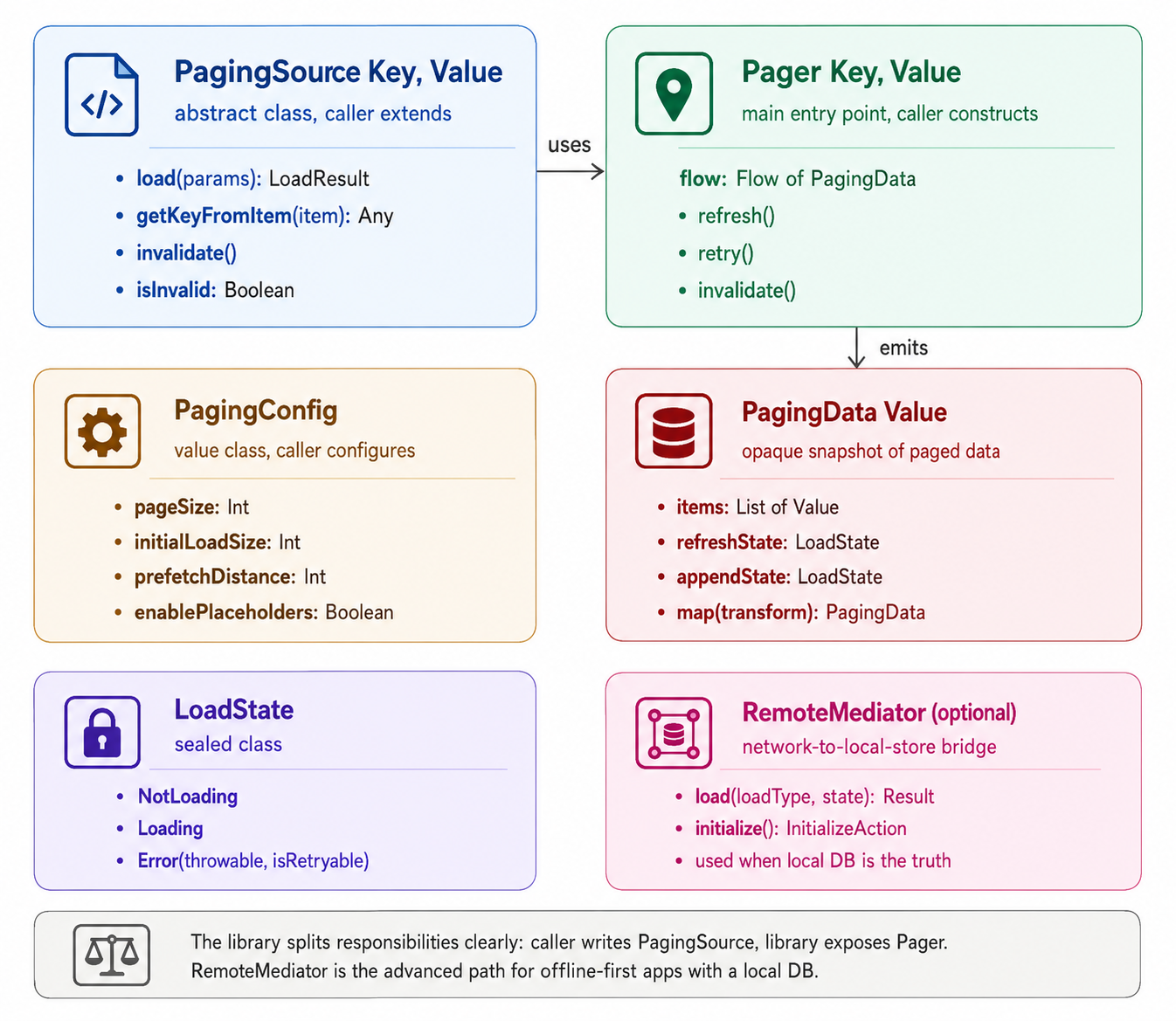
The Class Diagram
The Pager — Main Entry Point
class Pager<Key : Any, Value : Any> private constructor(
    private val config: PagingConfig,
    private val sourceFactory: () -> PagingSource<Key, Value>,
    private val remoteMediator: RemoteMediator<Key, Value>? = null
) {

    private val refreshTrigger = MutableSharedFlow<Unit>(replay = 1)

    val flow: Flow<PagingData<Value>> = refreshTrigger
        .onStart { emit(Unit) }                       // emit once for initial load
        .flatMapLatest {                              // cancel previous on refresh
            val source = sourceFactory()
            PagingDataFlow(config, source, remoteMediator)
        }

    fun refresh() {
        refreshTrigger.tryEmit(Unit)
    }

    fun retry() {
        // Forwarded to the active PagingDataFlow's internal retry channel
        currentFlow?.retry()
    }

    fun invalidate() {
        currentFlow?.source?.invalidate()
        refresh()
    }

    class Builder<Key : Any, Value : Any> {
        // ...builder DSL implementation
    }

    companion object {
        fun <Key : Any, Value : Any> builder(
            block: Builder<Key, Value>.() -> Unit
        ): Builder<Key, Value> = Builder<Key, Value>().apply(block)
    }
}
“Three things to note in this design:
flatMapLateston the refresh trigger. Whenrefresh()is called, the in-flight flow is cancelled and a new one starts. Standard Kotlin Flow pattern.- The source is created lazily via factory. Each new flow gets a fresh source. The source can hold per-load state (cursors, retry counts) without leaking between refreshes.
flowis the only data output. Everything else is methods called by the UI. The library exposes data as a Flow because that composes naturally with Kotlin coroutines and Compose."
The PagingData Snapshot
PagingData<Value> is what flows through. Each emission is a complete snapshot of the current paged state.
data class PagingData<Value : Any>(
    val items: List<Value>,
    val placeholderCountStart: Int = 0,
    val placeholderCountEnd: Int = 0,
    val refreshState: LoadState,
    val appendState: LoadState
) {
    fun <NewValue : Any> map(
        transform: (Value) -> NewValue
    ): PagingData<NewValue> = PagingData(
        items = items.map(transform),
        placeholderCountStart = placeholderCountStart,
        placeholderCountEnd = placeholderCountEnd,
        refreshState = refreshState,
        appendState = appendState
    )

    fun filter(predicate: (Value) -> Boolean): PagingData<Value> = PagingData(
        items = items.filter(predicate),
        placeholderCountStart = placeholderCountStart,
        placeholderCountEnd = placeholderCountEnd,
        refreshState = refreshState,
        appendState = appendState
    )
}
“Why include load state inside PagingData? Because the UI needs both. To show a loading spinner at the bottom of the list, the UI checks appendState. To show a refresh spinner at top, refreshState. By bundling them, the UI gets one observable that contains everything it needs."
The Builder DSL
A common library design challenge: how do you give callers fine-grained configuration without overwhelming them?
“Use a Kotlin builder DSL with named blocks:
val pager = Pager.builder<String, Post> {
    source { PostsPagingSource(api) }

    config {
        pageSize = 20
        initialLoadSize = 40            // load 2 pages initially
        prefetchDistance = 5            // trigger next page 5 items from end
        enablePlaceholders = false
    }

    remoteMediator {                    // optional
        PostsRemoteMediator(api, db)
    }

    retry {
        maxAttempts = 3
        initialDelayMs = 500
        multiplier = 2.0
    }
}.build()
Each block is optional except source. The IDE shows autocomplete for valid block names. Defaults are sane.
The DSL groups related options together. config.pageSize is more discoverable than pageSize as a top-level parameter."
Builder Implementation Sketch
class PagerBuilder<Key : Any, Value : Any> {
    private var sourceFactory: (() -> PagingSource<Key, Value>)? = null
    private var config: PagingConfig = PagingConfig.DEFAULT
    private var remoteMediator: RemoteMediator<Key, Value>? = null
    private var retryPolicy: RetryPolicy = RetryPolicy.DEFAULT

    fun source(factory: () -> PagingSource<Key, Value>) {
        this.sourceFactory = factory
    }

    fun config(block: PagingConfigBuilder.() -> Unit) {
        config = PagingConfigBuilder().apply(block).build()
    }

    fun remoteMediator(factory: () -> RemoteMediator<Key, Value>) {
        this.remoteMediator = factory()
    }

    fun retry(block: RetryPolicyBuilder.() -> Unit) {
        retryPolicy = RetryPolicyBuilder().apply(block).build()
    }

    fun build(): Pager<Key, Value> {
        val factory = checkNotNull(sourceFactory) {
            "source { ... } block is required"
        }
        return Pager(config, factory, remoteMediator, retryPolicy)
    }
}
“Note the failure-loud check: if the caller forgets source { ... }, we throw at build() with a clear message. Type system can't catch this — we use runtime check with a helpful error.
Other validation: pageSize > 0, prefetchDistance >= 0, etc. All explicit, all early."
Step 4: The Data Source Interface
The PagingSource is the caller's primary contract with the library. Get this right and adoption is easy; get it wrong and callers struggle.
The Source Lifecycle
“Each PagingSource instance has a finite life:
- Created via factory (when
Pager.flowis collected orrefresh()is called). - Asked to
load()zero or more times. - Invalidated (via
invalidate()) when stale. - Discarded. Garbage collected.
A new source is created on every refresh. The source must be stateless except for its construction args (API client, DB) — it shouldn’t hold mutable state across refreshes.”
The Invalidate Pattern
abstract class PagingSource<Key : Any, Value : Any> {

    abstract suspend fun load(params: LoadParams<Key>): LoadResult<Key, Value>

    abstract fun getKeyFromItem(item: Value): Any

    private val invalidatedFlag = AtomicBoolean(false)
    private val callbacks = CopyOnWriteArrayList<() -> Unit>()

    val isInvalid: Boolean get() = invalidatedFlag.get()

    fun invalidate() {
        if (invalidatedFlag.compareAndSet(false, true)) {
            callbacks.forEach { it() }
        }
    }

    fun addInvalidationCallback(callback: () -> Unit) {
        callbacks.add(callback)
        if (invalidatedFlag.get()) callback()        // fire immediately if already invalid
    }
}
“Why a flag plus callbacks instead of just a flag? Because thePagerneeds to react when the source is invalidated externally — for example, the caller callspager.invalidate()from a mutation handler.
The Pager registers a callback. When fired, it triggers a refresh, which creates a new source. Atomic, thread-safe, and idempotent.”
Example — REST API Source
class PostsPagingSource(
    private val api: PostsApi,
    private val query: String
) : PagingSource<String, Post>() {

    override fun getKeyFromItem(item: Post): String = item.id

    override suspend fun load(
        params: LoadParams<String>
    ): LoadResult<String, Post> {
        return try {
            val response = api.fetchPosts(
                cursor = params.key,
                limit = params.loadSize,
                query = query
            )
            LoadResult.Page(
                items = response.posts,
                prevKey = null,                      // we're forward-only
                nextKey = response.nextCursor       // null = end of list
            )
        } catch (e: IOException) {
            LoadResult.Error(throwable = e, isRetryable = true)
        } catch (e: HttpException) {
            // 4xx errors are not retryable (bad query, auth failure)
            // 5xx errors are retryable
            LoadResult.Error(
                throwable = e,
                isRetryable = e.code() in 500..599
            )
        }
    }
}
Example — Local Database Source
class PostsLocalSource(
    private val dao: PostDao,
    private val query: String
) : PagingSource<Int, Post>() {                    // Int = offset

    override fun getKeyFromItem(item: Post): String = item.id

    override suspend fun load(
        params: LoadParams<Int>
    ): LoadResult<Int, Post> {
        val offset = params.key ?: 0
        val items = dao.getPosts(query, offset, params.loadSize)
        return LoadResult.Page(
            items = items,
            prevKey = if (offset > 0) (offset - params.loadSize).coerceAtLeast(0) else null,
            nextKey = if (items.size < params.loadSize) null else offset + params.loadSize
        )
    }
}
“Same PagingSource shape, different Key type, different load logic. The library doesn't care which is used. This is the strategy-agnostic design at work."
Where the Source Cannot Mistake Things
Three invariants the library relies on:
load()is suspending and can throw. Throws are caught and converted toLoadResult.Error. Source shouldn't try to handle errors itself unless they're business-meaningful.getKeyFromItemis pure and deterministic. Same item → same key. The library hashes and equals these for dedup.nextKey = nullmeans end of list. The library will stop attemptingAPPENDloads. If the caller mistakenly returns a key when there's no more data, the library will keep trying and eventually fall into a loop of empty pages."
Step 5: The Page Cache and In-Memory State
Now the internals. The library holds multiple pages in memory, indexed by load order, with logic for inserting new pages and evicting old ones.
The Page Cache Structure
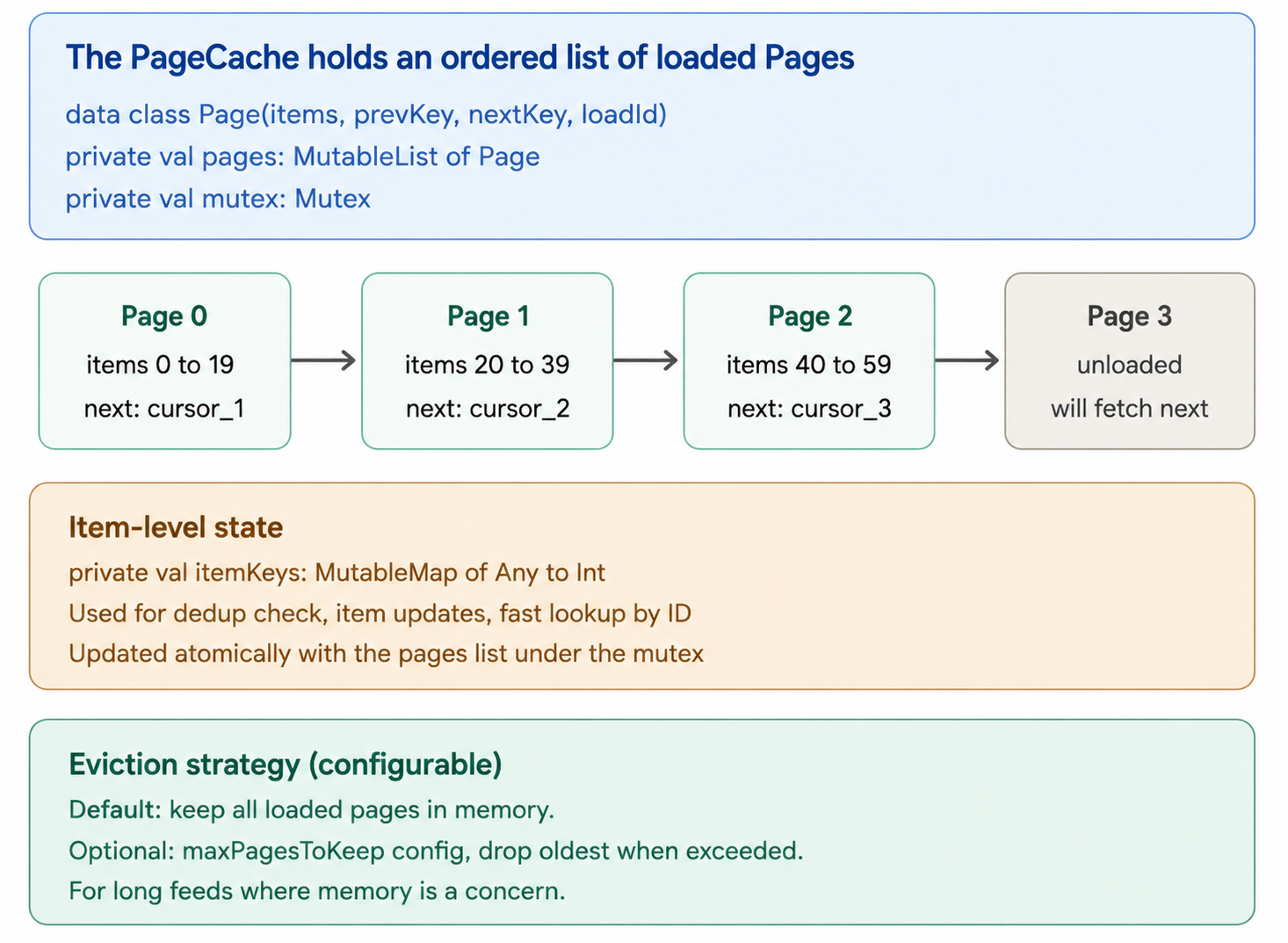
The PageCache Implementation
internal class PageCache<Key : Any, Value : Any>(
    private val source: PagingSource<Key, Value>,
    private val config: PagingConfig
) {
    private val mutex = Mutex()
    private val pages = mutableListOf<Page<Key, Value>>()
    private val itemKeyToIndex = mutableMapOf<Any, Int>()

    suspend fun appendPage(loaded: LoadResult.Page<Key, Value>): List<Value> {
        return mutex.withLock {
            val deduplicatedItems = loaded.items.filterNot { item ->
                itemKeyToIndex.containsKey(source.getKeyFromItem(item))
            }

            val newPage = Page(
                items = deduplicatedItems,
                prevKey = loaded.prevKey,
                nextKey = loaded.nextKey
            )
            pages.add(newPage)

            // Update item index
            val startIndex = computeFlatIndex()
            deduplicatedItems.forEachIndexed { i, item ->
                itemKeyToIndex[source.getKeyFromItem(item)] = startIndex + i
            }

            // Evict oldest if exceeded cap
            if (config.maxPagesToKeep != null && pages.size > config.maxPagesToKeep) {
                evictOldest()
            }

            flattenedItems()
        }
    }

    suspend fun clear() {
        mutex.withLock {
            pages.clear()
            itemKeyToIndex.clear()
        }
    }

    suspend fun snapshot(): List<Value> = mutex.withLock { flattenedItems() }

    private fun flattenedItems(): List<Value> = pages.flatMap { it.items }

    val nextKey: Key? get() = pages.lastOrNull()?.nextKey
    val isEndReached: Boolean get() = pages.isNotEmpty() && pages.last().nextKey == null
}
Two important properties:
- Deduplication is built in. If a server returns the same item across two pages (race conditions, retries, list reordering), we keep only the first occurrence. The
itemKeyToIndexmap enforces uniqueness. - All mutations are mutex-protected. Concurrent access from multiple coroutines (UI thread, background load, refresh) must serialize. The mutex makes ops atomic without locking out concurrent reads (snapshot is lockless after the snapshot is taken).
Why a List of Pages, Not a Flat List?
A naive design would just hold MutableList<Value> directly. Why pages?
Three reasons:
Boundary tracking. Each page knows its prevKey and nextKey. Needed to load adjacent pages and to detect end-of-list.
Eviction granularity. When dropping memory, we drop entire pages. Easier than tracking arbitrary index ranges.
Refresh consistency. A refresh clears the page list atomically. Mid-load, the user sees old data until refresh completes.
Updates to Existing Items
What if an item’s content changes (e.g., a post gets a new comment count)?
Same key, new content. When the data source returns an item whose key already exists in the cache, we replace the cached item with the new version.
This is critical for live lists. Imagine a feed where posts get more likes over time. Each refresh, the same posts return with updated counts. The library replaces in-place, the UI animates the change.
Implementation: in appendPage, before adding new items, check if they're already in itemKeyToIndex. If yes, replace in the corresponding page. If no, add as new.
Refined appendPage snippet:
val toReplace = mutableMapOf<Int, Value>()  // page index → item
val toInsert = mutableListOf<Value>()

loaded.items.forEach { item ->
    val key = source.getKeyFromItem(item)
    val existingFlatIndex = itemKeyToIndex[key]
    if (existingFlatIndex != null) {
        // Update in place — same key, fresher data
        replaceItem(existingFlatIndex, item)
    } else {
        toInsert.add(item)
        itemKeyToIndex[key] = computeFlatIndex() + toInsert.size - 1
    }
}
Concurrent Loads — Single Active Load Per Direction
Two loads in flight at once would race. The library serializes:
- At most one
REFRESHload active. - At most one
APPENDload active. - REFRESH cancels any in-flight APPEND.
This is enforced via coroutine Job tracking:
private var refreshJob: Job? = null
private var appendJob: Job? = null

fun triggerAppend() {
    if (appendJob?.isActive == true) return  // already loading
    if (cache.isEndReached) return            // no more data

    appendJob = scope.launch {
        val key = cache.nextKey ?: return@launch
        val result = source.load(LoadParams(key, config.pageSize, LoadType.APPEND))
        when (result) {
            is LoadResult.Page -> {
                cache.appendPage(result)
                emitState()
            }
            is LoadResult.Error -> {
                appendState = LoadState.Error(result.throwable, result.isRetryable)
                emitState()
            }
        }
    }
}

fun triggerRefresh() {
    refreshJob?.cancel()
    appendJob?.cancel()           // refresh cancels in-flight append

    refreshJob = scope.launch {
        cache.clear()
        emitState()                // emit empty state immediately
        val result = source.load(LoadParams(key = null, config.initialLoadSize, LoadType.REFRESH))
        // handle result...
    }
}
Coroutine cancellation makes this clean. Cancelling a Job propagates cancellation through all suspending calls, including the network call. No leaked I/O.
Step 6: Loading States and Error Handling
The UI needs to know what’s happening — initial load, loading more, error, done. A clean state model makes the API intuitive.
The LoadState Sealed Class
sealed class LoadState {
    abstract val endOfPaginationReached: Boolean

    data class NotLoading(
        override val endOfPaginationReached: Boolean
    ) : LoadState()

    data object Loading : LoadState() {
        override val endOfPaginationReached: Boolean = false
    }

    data class Error(
        val throwable: Throwable,
        val isRetryable: Boolean,
        override val endOfPaginationReached: Boolean = false
    ) : LoadState()
}
Three states per direction (refresh, append):
- NotLoading. Idle. Either ready for more, or end reached.
- Loading. A load is in flight.
- Error. A load failed.
The endOfPaginationReached flag distinguishes 'done loading, more available' from 'done loading, end of list.' UI uses this to hide the loading-row at the bottom.
Combined LoadStates
PagingData exposes two LoadState fields:
refreshState— state of the initial / refresh load.appendState— state of the next-page (load-more) load.
The UI consumes these differently:
- refreshState drives the pull-to-refresh spinner and the full-screen empty/error state when the list is empty.
- appendState drives the bottom-of-list spinner and the retry row at the bottom on error.
When refresh succeeds, the loaded items render and refreshState becomes NotLoading. The user can now scroll.
Error Modeling
“isRetryable is a hint, not a guarantee. The library uses it to drive automatic retry behavior and to decide if the 'Retry' button is visible.- Retryable errors: network timeouts, 5xx server errors, connection drops. Worth retrying.
- Non-retryable errors: 4xx (bad request, auth failure), parsing errors, programmer errors. Retrying won’t help.
The caller’s source decides which is which when constructing LoadResult.Error.
Automatic Retry With Exponential Backoff
class RetryingLoader<Key : Any, Value : Any>(
    private val source: PagingSource<Key, Value>,
    private val policy: RetryPolicy
) {
    suspend fun load(params: LoadParams<Key>): LoadResult<Key, Value> {
        var attempt = 0
        var delayMs = policy.initialDelayMs

        while (true) {
            val result = source.load(params)
            if (result is LoadResult.Page) return result
            if (result is LoadResult.Error && !result.isRetryable) return result
            if (attempt >= policy.maxAttempts) return result  // give up

            delay(delayMs)
            attempt++
            delayMs = (delayMs * policy.multiplier).toLong().coerceAtMost(policy.maxDelayMs)
        }
    }
}

data class RetryPolicy(
    val maxAttempts: Int = 3,
    val initialDelayMs: Long = 500,
    val maxDelayMs: Long = 10_000,
    val multiplier: Double = 2.0
) {
    companion object {
        val DEFAULT = RetryPolicy()
        val NONE = RetryPolicy(maxAttempts = 0)
    }
}
Three retries with exponential backoff: 500ms → 1s → 2s. Total wait time about 3.5 seconds before surfacing the error to the UI.
For the user, this feels like ‘it’s just taking a while’ rather than ‘it failed immediately.’ Most transient failures self-heal in this window.
Manual Retry From the UI
class Pager<Key : Any, Value : Any>(/* ... */) {
    private val retrySignal = MutableSharedFlow<Unit>()

    fun retry() {
        retrySignal.tryEmit(Unit)
    }

    // Inside the flow logic, retry signals trigger re-loading the failed page
}
If the user taps the retry button on the error row, we just re-fire the failed load with the same params. The library doesn’t need to remember which page failed — it knows what comes next from the cache’s nextKey.
Same for refresh on initial load error — just call refresh() again.
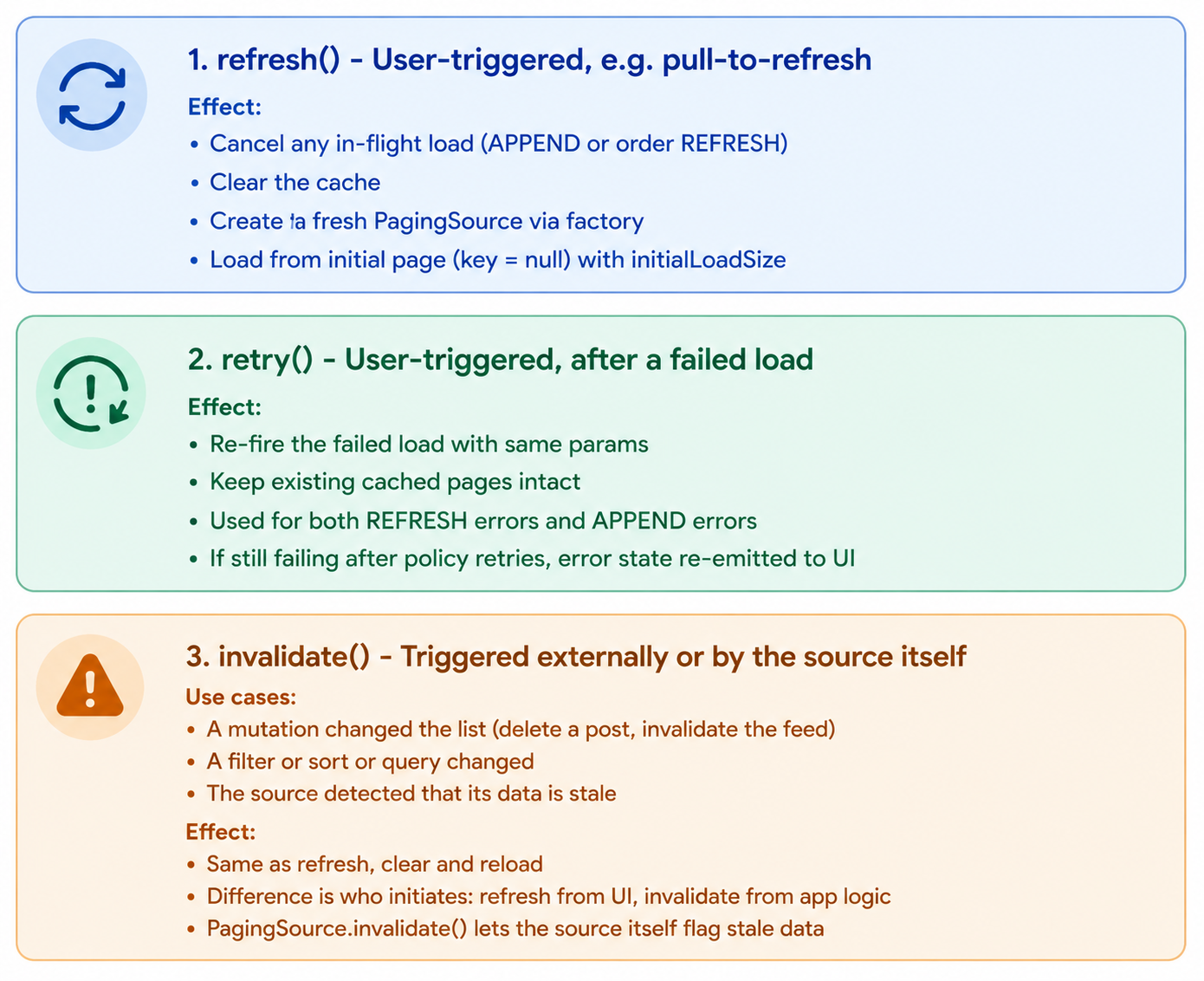
Step 7: Refresh, Retry, and Invalidation
These three operations look similar but have different semantics. Getting them precisely right matters.
A Common Pattern — Mutation Invalidation
“Imagine the user deletes a post. The pager doesn’t know about it. The cached pages still contain the deleted post.
Solution: the mutation code calls pager.invalidate() after the mutation succeeds. The library refreshes, the deleted post no longer appears.
Better: the source itself notices and invalidates. For example, a Room-backed source can observe the table — when a delete happens, the underlying query result changes, and the source can call invalidate(). Then no app-level coordination is needed.
class PostsLocalSource(
    private val dao: PostDao
) : PagingSource<Int, Post>() {

    init {
        // Observe the table — invalidate when it changes
        dao.observeInvalidationToken()
            .onEach { invalidate() }
            .launchIn(GlobalScope)
    }

    // ...load implementation
}
Room provides exactly this ‘invalidation token’ API for paging sources. The library design encourages this pattern by making invalidate() a first-class operation on the source.
Refresh Race Conditions
A subtle bug to design around: user triggers refresh just as an append load completes.
Sequence:
- T=0: User scrolls, append load fires for page 3.
- T=1: User pulls to refresh. Refresh fires, page 3 load is cancelled.
- T=1.01: Page 3 load already returned (just before cancellation). What now?
Solution: load results are checked against a generation counter. Each refresh increments the generation. Load results with a stale generation are discarded.
private var currentGeneration = 0

suspend fun triggerAppend() {
    val gen = currentGeneration
    val result = source.load(/*...*/)
    if (gen != currentGeneration) return  // stale, refresh happened
    // apply result
}
This pattern is standard in async UI work. The Paging 3 library uses it. Apollo Client (GraphQL) does too.
Step 8: UI Binding and Threading Model
The library emits data via Flow<PagingData<Value>>. UI integration is a thin layer that consumes this flow and binds it to lists. Two main UI frameworks need bindings: Compose LazyColumn and RecyclerView.
Compose Integration — LazyPagingItems
@Composable
fun <T : Any> Flow<PagingData<T>>.collectAsLazyPagingItems(): LazyPagingItems<T> {
    val state = remember { LazyPagingItems<T>(this) }

    LaunchedEffect(this) {
        collect { pagingData ->
            state.update(pagingData)
        }
    }

    return state
}

class LazyPagingItems<T : Any>(
    private val flow: Flow<PagingData<T>>
) {
    private var current: PagingData<T> by mutableStateOf(PagingData.Empty())

    val itemCount: Int get() = current.items.size +
                              current.placeholderCountStart +
                              current.placeholderCountEnd

    operator fun get(index: Int): T? {
        val realIndex = index - current.placeholderCountStart
        return if (realIndex in current.items.indices) current.items[realIndex] else null
    }

    val loadState: CombinedLoadState
        get() = CombinedLoadState(
            refresh = current.refreshState,
            append = current.appendState
        )

    fun retry() {
        // Forwards to the Pager's retry
    }

    fun refresh() {
        // Forwards to the Pager's refresh
    }

    internal fun update(pagingData: PagingData<T>) {
        current = pagingData
    }
}
How the UI Triggers Pagination
Pagination is triggered by scroll proximity. When the user scrolls within prefetchDistance of the end of the loaded items, the library fires triggerAppend().
In Compose, the cleanest way is to detect when a placeholder item is rendered. The LazyColumn only composes visible items. When a placeholder past the end appears, we know we're near the boundary.
@Composable
fun PostsScreen(pager: Pager<String, Post>) {
    val items = pager.flow.collectAsLazyPagingItems()

    LazyColumn {
        items(
            count = items.itemCount,
            key = { index -> items[index]?.id ?: "placeholder_$index" }
        ) { index ->
            val post = items[index]

            // Trigger prefetch when within prefetchDistance from end
            if (index >= items.itemCount - pager.config.prefetchDistance) {
                LaunchedEffect(index) {
                    pager.triggerAppend()
                }
            }

            if (post != null) PostRow(post) else PlaceholderRow()
        }

        when (val state = items.loadState.append) {
            is LoadState.Loading -> item { LoadingFooter() }
            is LoadState.Error -> item { RetryFooter(state.throwable) { items.retry() } }
            is LoadState.NotLoading -> if (state.endOfPaginationReached) item { EndOfListFooter() }
        }
    }
}
Three things this caller code does well:
- Stable keys.
key = { items[index]?.id ?: ... }enables Compose's recompositions and animations to track items across updates. - Prefetch trigger. The
LaunchedEffect(index)fires once per visible index when first composed. By then we're near the boundary; library can start loading. - Load state items. The footer reflects current state — loading spinner, retry row, or ‘no more’ indicator. UI doesn’t have to maintain this state itself.
RecyclerView Integration — PagingDataAdapter
abstract class PagingDataAdapter<T : Any, VH : RecyclerView.ViewHolder>(
    private val diffCallback: DiffUtil.ItemCallback<T>
) : RecyclerView.Adapter<VH>() {

    private val differ = AsyncPagingDataDiffer(diffCallback)

    fun submitData(scope: CoroutineScope, flow: Flow<PagingData<T>>) {
        scope.launch {
            flow.collect { differ.submitData(it) }
        }
    }

    override fun getItemCount(): Int = differ.itemCount

    fun getItem(position: Int): T? = differ.peek(position)

    fun retry() = differ.retry()
    fun refresh() = differ.refresh()
}
The DiffUtil callback is how the adapter knows which items changed when a new PagingData emission arrives. Same getKeyFromItem philosophy — caller provides equals and key comparison; library handles the diffing.
Internally, AsyncPagingDataDiffer runs diff on a background thread (DiffUtil is slow on large lists), then dispatches the patches to the main thread for binding.
Threading Model — Explicit Contract
Library threading guarantees:
Source.load() runs on the IO dispatcher by default. Network and disk are off the main thread. Caller can override via builder.
PagingData emissions land on Main.immediate by default. The Flow’s downstream operators (UI binding) run on main. This means collectAsLazyPagingItems doesn't need to switch threads.
Diff computations run on Default dispatcher. Heavy comparison work doesn’t block main.
Mutex operations are coroutine-safe. Multiple coroutines can call methods on the same Pager; the mutex serializes mutating ops.
Document this clearly in the library’s KDoc. Threading bugs in libraries are silent killers.
iOS Equivalent — AsyncStream
For iOS, the mapping is:
Replace Flow with AsyncStream (Swift Concurrency). The shape is identical:
public actor Pager<Key: Hashable & Sendable, Value: Sendable> {
    public let stream: AsyncStream<PagingData<Value>>
    public func refresh() { /* ... */ }
    public func retry() { /* ... */ }
    public func invalidate() { /* ... */ }
}
Swift actor provides serialized state access — same job as Kotlin's Mutex. Sendable constraints ensure thread-safety.
SwiftUI binding uses @Observable or @State with the Pager as a member, observing emissions via for await ... in pager.stream { ... }
Step 9: Local Persistence Integration
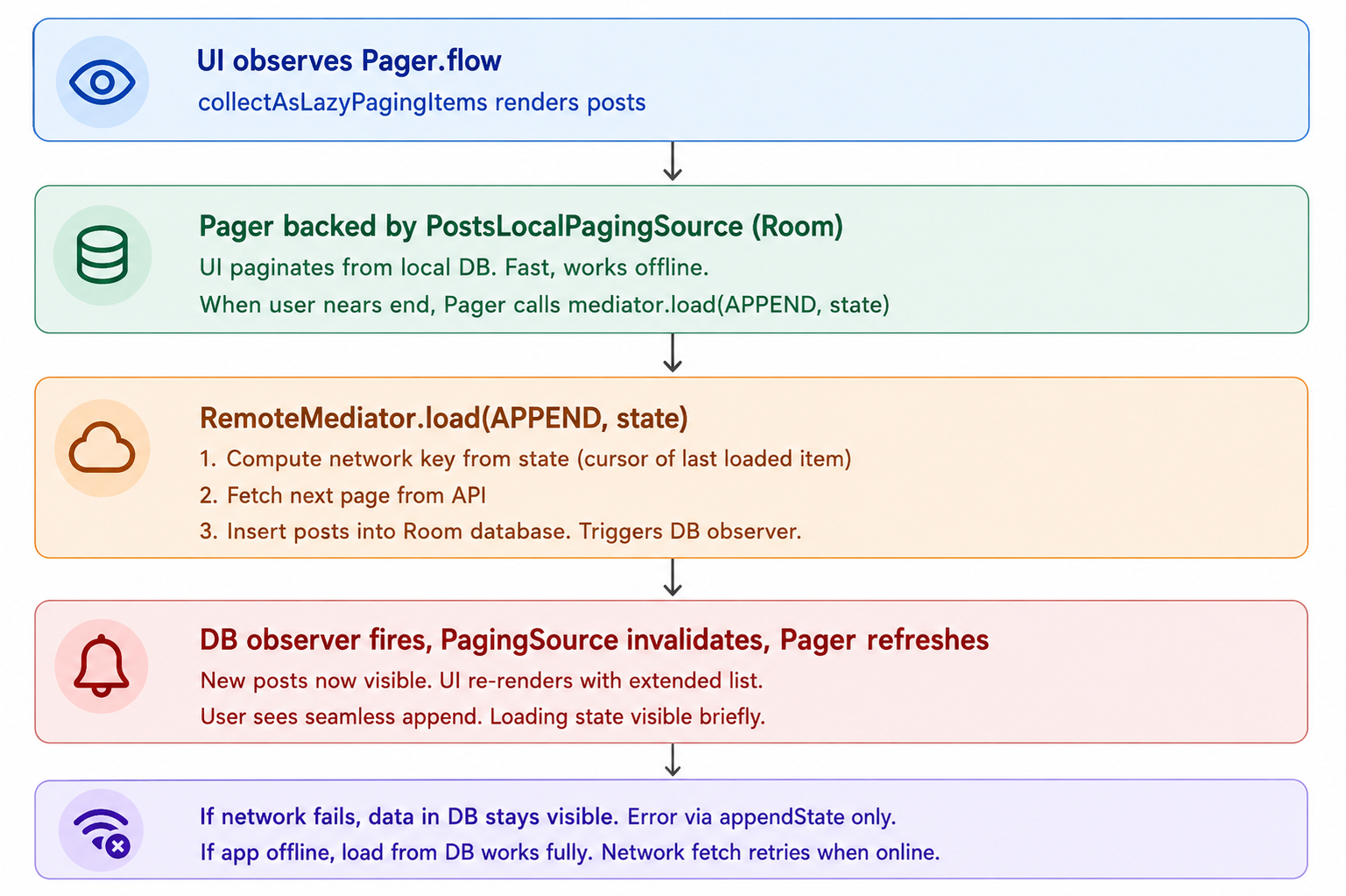
So far the library is in-memory only. For offline-first apps with a local database, we need the RemoteMediator pattern.
Why RemoteMediator?
The default pattern is:
- PagingSource = the data source the UI displays.
But sometimes the UI displays a local DB cache, while a separate background process refreshes it from the network. Two concerns:
- UI’s truth: the local DB. Always paginates from DB.
- Network’s truth: the API. Periodically syncs into DB.
RemoteMediator bridges these. It’s a callback invoked by the library when the UI hits a boundary (start or end of available data), telling the mediator: ‘I need more data. Go fetch it.
The RemoteMediator Interface
abstract class RemoteMediator<Key : Any, Value : Any> {

    open suspend fun initialize(): InitializeAction = InitializeAction.LAUNCH_INITIAL_REFRESH

    abstract suspend fun load(
        loadType: LoadType,
        state: PagingState<Key, Value>
    ): MediatorResult

    sealed class MediatorResult {
        data class Error(val throwable: Throwable) : MediatorResult()
        data class Success(val endOfPaginationReached: Boolean) : MediatorResult()
    }

    enum class InitializeAction {
        LAUNCH_INITIAL_REFRESH,   // start with a refresh
        SKIP_INITIAL_REFRESH      // assume cached data is fresh enough
    }
}

data class PagingState<Key : Any, Value : Any>(
    val pages: List<Page<Key, Value>>,
    val anchorPosition: Int?,
    val config: PagingConfig
) {
    fun closestItemToPosition(position: Int): Value? { /* ... */ }
    fun firstItemOrNull(): Value? { /* ... */ }
    fun lastItemOrNull(): Value? { /* ... */ }
}
A Concrete Example — Posts with Room Cache
class PostsRemoteMediator(
    private val api: PostsApi,
    private val db: AppDatabase
) : RemoteMediator<Int, Post>() {

    override suspend fun load(
        loadType: LoadType,
        state: PagingState<Int, Post>
    ): MediatorResult {
        return try {
            val cursor = when (loadType) {
                LoadType.REFRESH -> null
                LoadType.APPEND -> state.lastItemOrNull()?.id ?: return MediatorResult.Success(true)
            }

            val response = api.fetchPosts(cursor = cursor, limit = state.config.pageSize)

            db.withTransaction {
                if (loadType == LoadType.REFRESH) {
                    db.postDao().clearAll()
                }
                db.postDao().insertAll(response.posts)
            }

            MediatorResult.Success(endOfPaginationReached = response.nextCursor == null)
        } catch (e: IOException) {
            MediatorResult.Error(e)
        }
    }
}

// Combined with a local source
val pager = Pager.builder<Int, Post> {
    source { db.postDao().pagingSource() }
    remoteMediator { PostsRemoteMediator(api, db) }
    config {
        pageSize = 20
    }
}.build()
The user sees data from Room. The mediator handles the network → Room sync.
Two coupling points:
- The mediator inserts into the DB.
- Room’s invalidation API tells the source to re-paginate from DB.
The library doesn’t need to coordinate these; the DB does the coordination via change notifications.
Why Not Just Cache Pages in Memory?
Three reasons RemoteMediator pattern beats memory-only caching for offline-first apps:
Persistence across app restarts. Memory cache dies. DB survives.
Shared with other features. The cached posts might appear elsewhere in the app (notifications, profile, search). One source of truth is the DB.
Crash safety. If the app crashes mid-scroll, the next launch starts with the same data already cached.
Step 10: Wrap-Up and Follow-Up Topics
The Senior-Level Summary
Let me wrap up. I designed a Kotlin pagination library for Android that supports any pagination strategy — offset, cursor, keyset — via a generic Key type parameter. Forward-only for v1, with extension paths for bidirectional. Emits PagingData<Value> via a Flow. Provides UI bindings for Compose LazyColumn and RecyclerView. In-memory caching by default, with RemoteMediator for offline-first apps using Room.
Public API has six core abstractions: PagingSource (caller-extended), LoadParams/LoadResult (input/output contracts), Pager (main entry point), PagingData (snapshot emitted to UI), PagingConfig (caller configuration), LoadState (observable load lifecycle). Optional: RemoteMediator for network-to-DB bridging.
Strategy-agnosticism comes from the generic Key type. Source decides what keys mean. Library handles paging mechanics: cache, deduplication, prefetch trigger, load state.
Builder DSL with named blocks for ergonomic, IDE-friendly configuration. Required fields enforced at build(). Sensible defaults for everything else.
Page cache is mutex-protected with a list of Page plus an itemKey → flatIndex map for O(1) dedup. Updates to existing items replace in-place. Eviction policy is optional via maxPagesToKeep.
Single active load per direction. Refresh cancels in-flight append. Generation counter discards stale results from cancelled loads.
Three operations on the API: refresh() (user pull-to-refresh — cancel and reload), retry() (after error — re-fire failed load), invalidate() (app-initiated or source-initiated — same effect as refresh, different trigger).
LoadState exposed as a sealed class with NotLoading, Loading, Error variants. Refresh and Append states separate so UI can render two regions independently.
Automatic retry with exponential backoff for retryable errors. 3 attempts, 500ms → 1s → 2s. Non-retryable errors surface immediately. UI can manually retry via retry().
UI bindings use stable keys for diffing and view recycling. Compose’s LazyPagingItems collects the flow into a mutable state. RecyclerView's PagingDataAdapter runs DiffUtil on background thread. Prefetch triggers on visible items within prefetchDistance of the end.
Threading model is explicit: source loads on IO, emissions on Main.immediate, diff on Default. Documented in KDoc.
RemoteMediator pattern for offline-first apps. Local source paginates from Room, mediator syncs from API into Room when boundary is hit. DB observability triggers re-pagination. Same Pager API.
Biggest trade-offs: generic over Key type (flexibility vs caller complexity), in-memory default (simpler than DB-backed by default), flatMapLatest on refresh (cancels in-flight loads cleanly but discards their results), separate refresh/append states (two state slots vs one combined), DSL builder over constructor (more API surface but more discoverable).
This summary captures 50+ minutes of design in under 3 minutes. Practice it.
Likely Follow-Up Topics
“How would you support bidirectional pagination?”
Add LoadType.PREPEND. PagingSource needs prevKey. PageCache must support prepending items. UI bindings detect when user scrolls near top and triggers PREPEND. Compose: an extra LaunchedEffect at index < prefetchDistance. This is what Android Paging 3 supports natively.
“How would you support jumping to arbitrary positions (skip to page 100)?”
Add an initialKey parameter on the Pager. Source must support seeking. Offset-based sources do this trivially; cursor-based need a 'cursor lookup' API. Anchored loads (Paging 3 has this) — load around a specific position.
“How would you handle live data updates (item changes after load)?”
Two approaches:
- The source detects changes and invalidates — full refresh. Simple, sometimes wasteful.
- The source exposes an update stream —
Flow<ItemUpdate<Value>>. Library applies updates in-place by key. Smoother UX. Add this as an opt-in feature.
“How would you support multiple list types in one Pager (sections, headers)?”
Make Value a sealed class: sealed class FeedItem { data class Post; data class Ad; data class Header }. The source returns mixed items in the right order. UI dispatch on type. The library is generic enough to handle this.
“How would you reduce memory for long lists?”
Configure maxPagesToKeep. When exceeded, evict from the middle (keep visible window). Re-fetch on scroll-back. Trade-off: more network for less memory. Default is unlimited; long-feed apps opt in.
“How would you implement local search/filter on cached data?”
Add a transform: (PagingData<Value>) -> PagingData<Value> operator on the Flow. Caller passes a filter; library applies after emissions. But fundamentally local filtering only filters loaded pages — for full search, prefer a new source with a query parameter.
“How would you test this library?”
Three test surfaces:
- Unit tests on PageCache (concurrent loads, dedup, eviction), retry policy, state machine transitions.
- Integration tests with a fake
PagingSourcethat returns scripted results — test error flows, refresh, invalidation timing. - UI tests with both LazyColumn and RecyclerView ensuring prefetch triggers correctly and DiffUtil produces stable scroll positions.
“How does this compare to Android’s Paging 3?”
Same architecture, virtually identical concepts. The names match: PagingSource, Pager, PagingData, RemoteMediator. Differences in our version: simpler builder DSL, explicit threading model in KDoc, retry policy is configurable, no Paging 1 or Paging 2 legacy. We made the API more opinionated about defaults.
“How would you support GraphQL connections?”
GraphQL Relay-style connections have pageInfo.endCursor and hasNextPage built in. A GraphQLPagingSource extension that takes a query function and unwraps the connection automatically. Could ship as a separate module.
“What’s your versioning strategy?” Semantic versioning. Public API changes require major bump. Adding optional fields is minor. Bug fixes are patch. Use @RequiresOptIn annotations for experimental APIs. Deprecate gradually with @Deprecated(message, replaceWith).
Summary
Library design is a distinct discipline from app design. The user is a developer; the surface area is types, signatures, and contracts; backward compatibility is sacred. Pagination is a particularly rich library design problem because it touches networking, persistence, threading, UI binding, and state management at once.
Step 1 — Clarification establishes seven pillars: strategy agnosticism, ergonomic API, thread safety, configurable caching, deduplication, error handling, and UI integration.
Step 2 — Pagination strategies lands on a generic Key type parameter. The library supports offset, cursor, and keyset by letting the caller pick the key type.
Step 3 — Core abstractions are six classes: PagingSource, LoadParams/LoadResult, Pager, PagingData, PagingConfig, LoadState. Builder DSL for ergonomic configuration.
Step 4 — Data source interface is the caller’s primary contract. load() returns LoadResult.Page or LoadResult.Error. getKeyFromItem() enables dedup. Invalidation triggers refresh.
Step 5 — Page cache is a mutex-protected list of pages with an item-key-to-index map for O(1) dedup and updates. Single active load per direction, generation counter for stale-result discard.
Step 6 — Loading states uses a sealed class with NotLoading, Loading, Error. Two states per PagingData — refresh and append — for independent UI regions. Automatic retry with exponential backoff for retryable errors.
Step 7 — Refresh, retry, invalidate are three distinct operations. Refresh and invalidate are equivalent in effect, different in trigger. Mutation handlers call invalidate(). Pull-to-refresh calls refresh(). Source can self-invalidate when observing a database.
Step 8 — UI binding has Compose (LazyPagingItems) and RecyclerView (PagingDataAdapter) integrations. Stable keys, prefetch on visible items, load-state items at the boundaries. Threading model is explicit and documented.
Step 9 — RemoteMediator is the network-to-local-DB bridge for offline-first apps. Local source paginates from Room; mediator syncs from API into Room; DB observability triggers re-pagination.
Step 10 — Wrap-up recaps and prepares for 10+ likely follow-ups: bidirectional pagination, position jumping, live updates, multi-type lists, memory caps, local filtering, testing, Paging 3 comparison, GraphQL, versioning.
The senior signal throughout: type-safe generic API, builder DSL for ergonomics, sealed-class state machines, explicit thread safety guarantees, lifecycle-aware coroutine handling, deduplication and update support built in, two-pipe RemoteMediator pattern for offline-first, well-documented threading model.
Quick Self-Check
- Why is
Keya type parameter instead of forcing a single pagination strategy? Give an example of one source whereKeyisIntand one where it'sString. - Walk through what happens when the user is mid-scroll (append load in flight) and they pull to refresh. How does the library handle the in-flight load’s eventual result?
- Why is automatic retry done with exponential backoff inside the library, even though the source returns
isRetryableon errors? - Explain why
getKeyFromItemreturnsAnyrather than theKeytype parameter. What two different kinds of keys are at play? - When would you use
Pager.invalidate()vsPager.refresh()? Give a concrete scenario for each.
Thank you for reading. 🙌🙏✌.
Need 1:1 Career Guidance or Mentorship?
If you’re looking for personalized guidance, interview preparation help, or just want to talk about your career path in mobile development — you can book a 1:1 session with me on Topmate.
I’ve helped many developers grow in their careers, switch jobs, and gain clarity with focused mentorship. Looking forward to helping you too!
Found this helpful? Don’t forgot to clap 👏 and follow me for more such useful articles about Android development and Kotlin or buy us a coffee here ☕
💥 Level Up Your Mobile Developer Interview !
Mastering AI for Android Developers
Your complete hands-on guide to integrating AI into Android apps — covering Generative AI, LLMs, on-device intelligence, AI APIs, real-world use cases, and practical implementation with modern Android development.
👉 Grab your copy now:
https://medium.com/@anandgaur2207/mastering-ai-for-android-developers-5cc6d62e7d21
Crack Android Interviews Like a Pro
Your complete Android interview preparation book — packed with real questions, deep explanations, and practical insights to help you stand out.
👉 Grab your copy now:
https://medium.com/@anandgaur2207/crack-android-interviews-with-confidence-the-only-handbook-youll-need-b87ec525f19c
iOS Developer Interview Handbook
From Swift fundamentals to advanced iOS concepts — a complete handbook to help you prepare smartly and confidently.
👉 Explore the book:
https://medium.com/@anandgaur2207/crack-ios-developer-interviews-with-confidence-the-complete-ios-developer-handbook-f1eabc3d7a21
Flutter Developer Interview Handbook
Ace your next Flutter interview with scenario-based questions, detailed explanations, and hands-on examples that make you stand out.
👉 Explore the book:
https://medium.com/@anandgaur2207/crack-flutter-developer-interviews-with-confidence-the-complete-flutter-developer-interview-6cb53996832c
React Native Developer Interview Handbook
Crack your next React Native interview with confidence!
This guide is packed with scenario-based questions, detailed explanations, and hands-on examples to help you stand out and succeed.
👉 Explore the book:
https://medium.com/@anandgaur2207/react-native-interview-crack-your-next-interview-with-confidence-0d7255a20fe1
If you need any help related to Mobile app development. I’m always happy to help you.
Follow me on: